
The SFX Editor opens when you create or double-click a .vsfx file. It provides a graphical interface for designing one-shot sound effects for the AY-3-8910 PSG, with a live Web Audio preview so you can hear the result instantly.
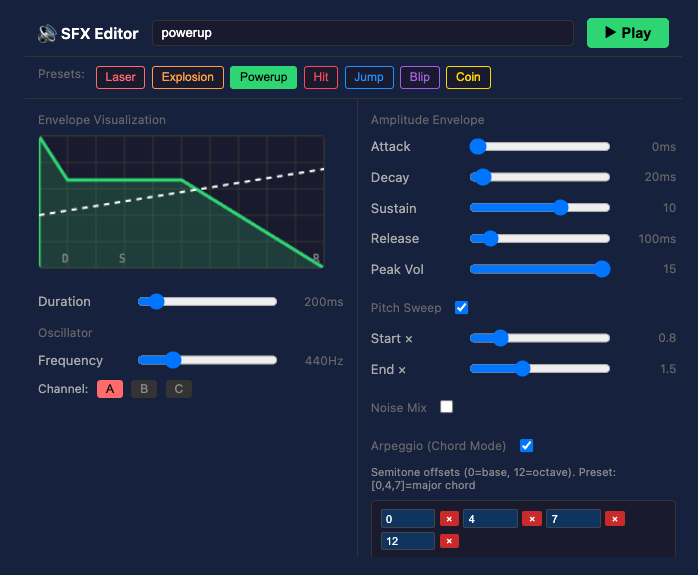
Presets
Seven built-in presets give you a starting point:
| Preset | Typical use |
|---|---|
| Laser | Fast downward pitch sweep |
| Explosion | Noise burst with decay |
| Power-up | Rising arpeggio |
| Hit | Short sharp noise |
| Jump | Upward pitch sweep |
| Blip | Short beep |
| Coin | Two-tone chime |
Click a preset to load it, then adjust the sliders to taste.
Envelope visualiser
The large graph on the left shows the amplitude envelope over time. The curve is colour-coded to match the preset category. A dashed white line overlaid shows the pitch sweep if enabled.
Controls
Basic
| Control | Range | Description |
|---|---|---|
| Duration | 20–2000 ms | Total length of the sound effect. |
| Frequency | 55–1760 Hz | Starting pitch of the oscillator. |
| Channel | A / B / C | Which PSG tone channel plays this effect. |
| Peak Vol | 1–15 | Maximum amplitude at the peak of the envelope. |
ADSR envelope
| Control | Range | Description |
|---|---|---|
| Attack | 0–500 ms | Time to ramp up from 0 to peak volume. |
| Decay | 0–500 ms | Time to fall from peak to sustain level. |
| Sustain | 0–15 | Volume level held after the decay phase. |
| Release | 0–1000 ms | Time to fade from sustain to 0 after the note ends. |
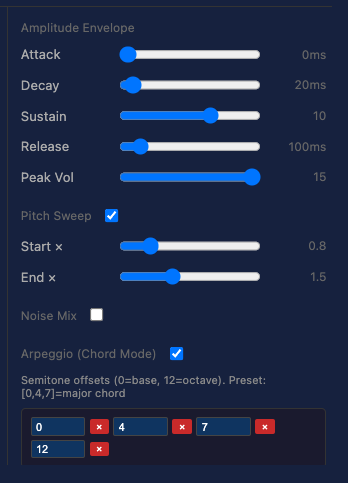
Pitch sweep
Enable the Pitch Sweep toggle to make the frequency change over the duration of the effect.
| Control | Description |
|---|---|
| Start multiplier | Frequency at the start, as a multiple of the base frequency (0.1×–4×). |
| End multiplier | Frequency at the end (0.1×–4×). |
A downward sweep (start > end) sounds like a laser shot or falling object. An upward sweep sounds like a jump or power-up.
Noise mix
Enable Noise Mix to blend white noise into the effect — useful for explosions, hits, and static bursts.
| Control | Range | Description |
|---|---|---|
| Period | 0–31 | Noise pitch/colour. 0 = highest pitch noise. |
| Volume | 0–15 | Noise amplitude. |
| Decay | ms | How quickly the noise fades out. |
Arpeggio
Enable Arpeggio to rapidly cycle through multiple pitches, creating a chord effect.
| Control | Description |
|---|---|
| Notes | Up to 3 semitone offsets added to the base frequency (0–24 semitones). |
| Speed | How fast the arpeggio cycles, in milliseconds per step (10–200 ms). |
Preview
Click Play in the header to hear the effect through the Web Audio API. The preview uses a square wave oscillator and matches the PSG output closely.
File format
{
  "version": "1.0",
  "name": "jump",
  "category": "jump",
  "duration": 200,
  "oscillator": { "frequency": 440, "channel": 0 },
  "envelope": { "attack": 5, "decay": 20, "sustain": 8, "release": 80, "peak": 12 },
  "pitch": { "enabled": true, "start_mult": 0.5, "end_mult": 2.0 },
  "noise": { "enabled": false, "period": 16, "volume": 8, "decay_ms": 100 },
  "modulation": { "arpeggio": false, "arpeggio_notes": [0, 7, 12], "arpeggio_speed": 40 }
}
In VPy code:
PLAY_SFX("jump")