Open Source · Free · For Vectrex Devs

Vectrex Development Made Easy
Write in VPy or C. Run it on the console.

Vectrex Studio is the modern IDE for Vectrex games. Write them in VPy, a Python-like language, or in C. Build for the original 6809 cartridge or RP2350 cartridges like the UVMC2. Test in the IDE's emulators, then upload to the console and debug it there over a USB cable.
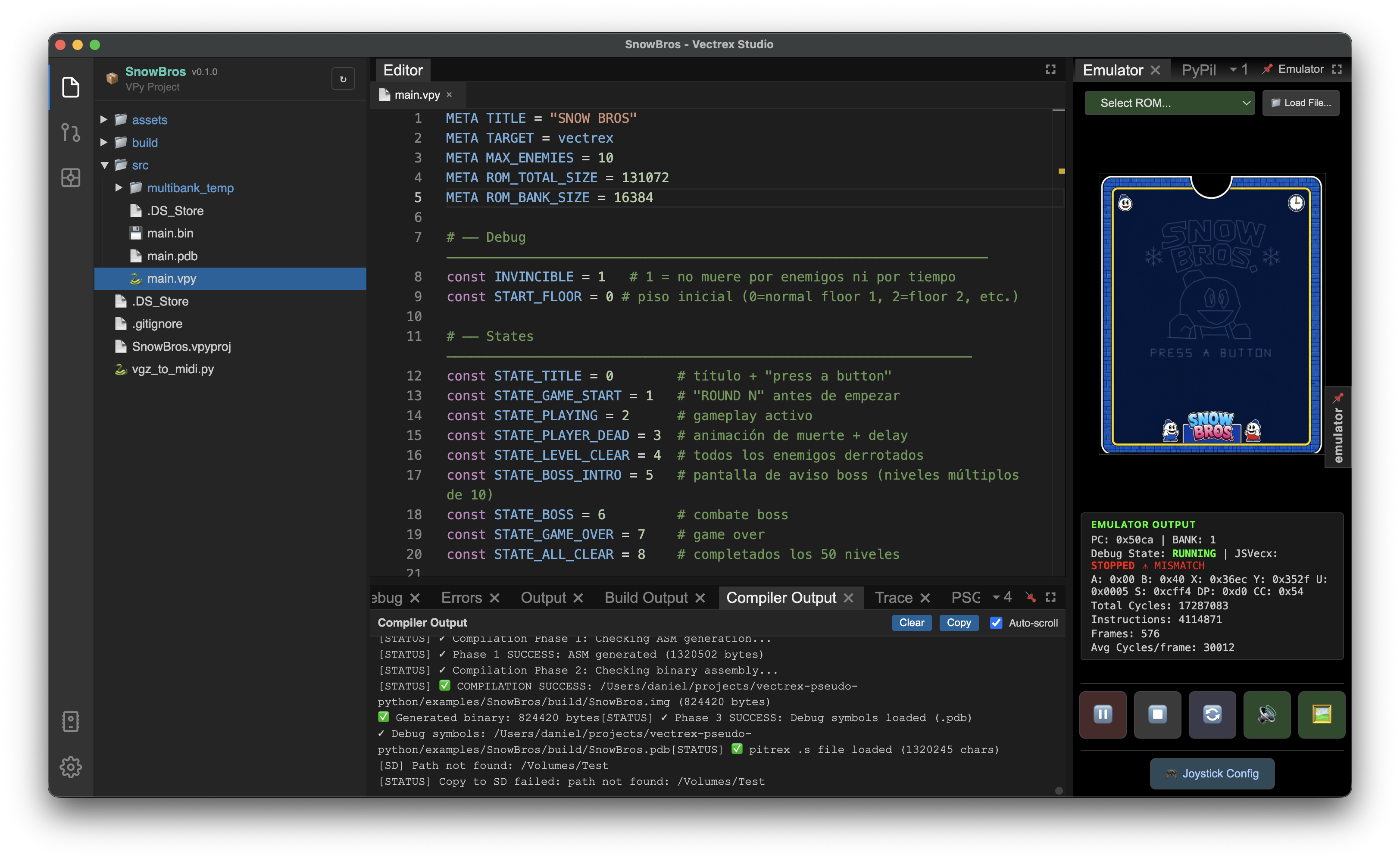
Vectrex Studio IDE — editor, emulator, debugger and build output

Features

Everything you need for Vectrex game development.

Two languages, one runtime, from the original cartridge to the RP2350 ones — with editors for every asset, emulators for every target, and a debugger that reaches the real console.

VPy Language

Python-like syntax designed for the Vectrex. Full access to BIOS calls, clean control flow, typed variables, and readable game logic — no raw assembly.

C & C++ Projects

Create or import C games and build them for the RP2350 cartridge, the UVMC2 and an in-IDE WASM simulator. clangd in the editor, the same libvpy runtime as VPy, and the same debugger.

9-Phase Rust Compiler

From source to ROM in nine discrete Rust phases — parse, unify, codegen, assemble, link, debug symbols. Targets 6809 ROMs, the RP2350 cartridge and the UVMC2 (PiTrex: not yet tested with the new SDK), and can build VPy through C for the ARM cartridges.

Updatable SDK

Each project pins the SDK release it builds with, and the IDE downloads it on demand — with the pico-sdk and the Arm toolchain. Upgrade one game without moving the others.

Multi-target Builds

Build for the original Vectrex MC6809, the RP2350 debug cartridge or the UVMC2 multicart (PiTrex: not yet tested with the new SDK) — switchable from the Settings panel, with each project's SDK pinned in its project file.

Upload to Cartridge

One menu item builds your game, copies it onto the UVMC2's SD card over USB and starts it on the console — about five seconds, no card reader.

Debug on the Console

Breakpoints, steps, call stack, hover values and Change Value on a game running on the real Vectrex, over the same USB cable. No probe needed; SWD for the RP2350 debug cartridge.

Cycle-Accurate Emulator

JSVecX runs 6809 ROMs in the IDE; ARM emulators run RP2350 and UVMC2 games down to the bus, GPIO, PIO and DMA, in real time; a WASM simulator runs C projects. Registers, memory, BIOS calls and PSG log included.

Source-Level Debugger

Breakpoints in VPy, C or MC6809 assembly, by file across every module. Step over, into and out, the call stack, hover values and Change Value — in the emulators, and through gdb.

3D Editors & Engine

Mesh, scene and skeletal-animation editors with wireframe and solid views, and 3D drawn in perspective with hidden-line removal, occluders and fog on the UVMC2.

Vector & Animation Editors

Draw vector shapes, bezier curves and walkable areas, with per-segment intensity. Compose multi-frame animations from .vec assets with per-frame inline paths.

Visual Level Editor

Full visual level editor for .vplay files. Place platforms, enemies, and hotspots. Paint walkable areas, set scroll limits, and test with live physics simulation.

Enemy System

Define enemy types with sprites, AI behaviour (patrol, wander, chase, flee), stats, and an optional state machine — all compiled to ROM tables automatically.

Music Editor

Piano roll composer for the AY-3-8910 PSG. Three tone channels, noise track, loop points, and MIDI import with merge, separate, or Tim Follin multiplex modes.

SFX & Instrument Editors

ADSR envelope editor with pitch sweep, noise mix, and arpeggio — with live Web Audio preview. Design instruments (.vinstr) with an audio analyser that maps real sounds to PSG parameters.

Multibank ROMs

Ship games bigger than 32KB with zero code changes. One META directive sets the ROM size up to 4 MB; the compiler handles bank allocation and switching automatically.

EPROM Programmer

Flash your compiled ROM directly to a physical EPROM chip (27C256, 27C512, 27C010…) using a TL866, T48, or T56 programmer — erase, write, verify, and blank-check without leaving the IDE.

Git Integration

Full Git client built into the sidebar. Stage, commit, push, pull, branch, stash, view diffs, resolve merge conflicts with a three-panel editor, and browse history.

Terminal with Claude Code

An integrated terminal with Claude Code connected to the IDE through MCP: it can read your project, run it, create checked assets, and upload to and debug on the cartridge.

PyPilot — AI Assistant

Built-in generative AI that understands VPy and Vectrex hardware. Supports Anthropic, OpenAI, Gemini, Groq, DeepSeek, GitHub Models, and local Ollama — no cloud required.

Windows, macOS & Linux

Every build — 6809, C, UVMC2, simulator — on Windows (x64 and ARM64), macOS and Linux. The IDE downloads and pins the toolchains it needs.