
A Vectrex Studio project is a folder with one TOML project file at its root. The file says what kind of project it is, how it builds, and which SDK release it builds against. The IDE fetches that SDK, and the toolchains around it, the first time a build needs them.
Two Kinds of Project
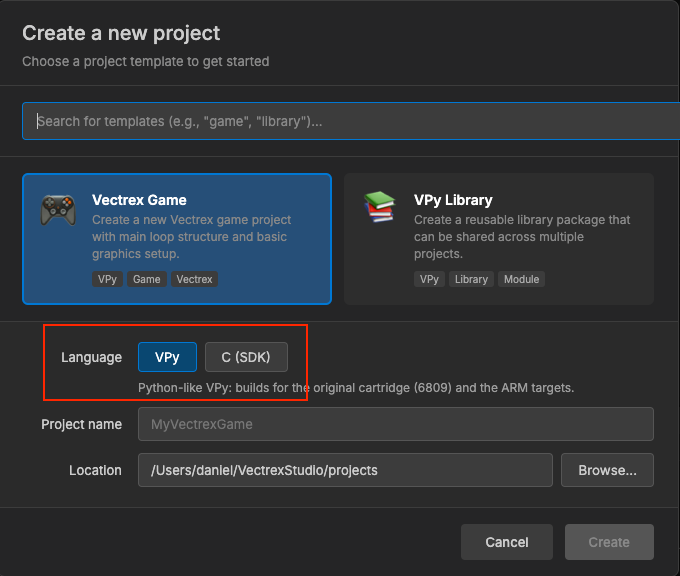
File → New → Project... asks for a Language, and that choice picks the project file:
| Language | Project file | Creates | Builds for |
|---|---|---|---|
| VPy | <name>.vpyproj | src/main.vpy, assets/ folders | m6809, rp2350, uvm2, pitrex (through vpy_cli) |
| C (SDK) | <name>.cvproj | Makefile, src/main.c on the libvpy runtime | WASM simulator, rp2350, uvm2 (through make) |
New projects go to ~/VectrexStudio/projects unless you pick another folder in the dialog. To bring in an existing C game, import its folder: if it already has a .cvproj, that is the one opened.
The .vpyproj file
This is what a new VPy project starts with (asset lines shortened):
[project]
name = "mygame"
version = "0.1.0"
entry = "src/main.vpy"

[build]
output = "build/mygame.bin"
optimization = 2
debug_symbols = true

[sources]
vpy = ["src/**/*.vpy"]

[resources]
vectors = ["assets/vectors/*.vec"]
music = ["assets/music/*.vmus"]
sfx = ["assets/sfx/*.vsfx"]
meshes = ["assets/meshes/*.vmesh"]

[sdk]
version = "v1.4.4"| Table | What it holds |
|---|---|
[project] | name, version and the entry file compiled first |
[build] | output path, optimization (0–2, default 2), debug_symbols, and optionally target |
[sources] | The VPy files that belong to the program |
[resources] | Asset folders: vectors, music, sfx, animations, levels, enemies, instruments, samples, meshes, scenes, skeletons, clips |
[sdk] | The pinned SDK release (below) |
The compiler finds assets by folder and your code names them by file name: DRAW_VECTOR("ship", x, y) draws assets/vectors/ship.vec.
The .cvproj file
A C project describes commands rather than sources: each target is a make recipe and the artifact it produces. A new C project looks like this:
[project]
name = "mygame"
type = "c-external"
target = "rp2350"
entry = "src/main.c"

[build]
command = "make"
args = ["rp2350"]
artifact = "build_rp2350/mygame_sd.bin"

[targets.uvm2]
command = "make"
args = ["uvm2"]
artifact = "build_uvm2/mygame.um2"

[simulate]
command = "make"
args = ["sim"]
module = "build_wasm/mygame.js"

[sdk]
version = "v1.4.4"| Table | What it holds |
|---|---|
[project] | name, type = "c-external", the default target, the entry file |
[build] | The default recipe, used when a target has no table of its own |
[targets.<target>] | A recipe per target (rp2350, uvm2, ...): command, args, artifact |
[simulate] | The WASM simulator build, run with Shift+F5; module is the generated .js |
[env] | Optional: overrides for the SDK variables the IDE passes to the build |
[sdk] | The pinned SDK release |
Imported projects can target other hardware too. The C examples in examples/individual_tests_c build for PiTrex, with target = "pitrex" and a kernel7l.img artifact.
The version strings above are examples. A new project is pinned to whatever the latest SDK release is when you create it.
The SDK, Pinned Per Project
ARM games and C projects link against the uvmc2-sdk, a runtime that lives in its own repository with its own releases. It does not ship inside the IDE. Instead, every project names the release it builds with:
[sdk]
version = "v1.4.4"- On demand. The first build that needs a release you don't have downloads it into
~/VectrexStudio/sdk/<tag>/. No git is needed: the IDE fetches the release archive and only marks the install complete at the end, so an interrupted download never leaves a half-installed SDK in use. - Per project. Two projects on two different releases build side by side, and moving one game to a new SDK does not move any other.
- Unpinned projects get pinned. A project with no
[sdk]table is pinned to the latest release the first time a build needs the SDK (offline: the newest installed one). The IDE writes the pin into the file and says so in the log. If there is no pin, no network and nothing installed, the build stops with an explicit error. - New projects start pinned. VPy and C projects created by the IDE, and imported C projects, are pinned to the latest release.
Some features need a minimum release. Upload to Cartridge and Debug on Cartridge on the UVMC2 need v1.4.0 or later, and UVM2 builds on Windows need v1.4.4 or later; the build output tells you when your pin is too old.
Which builds need the SDK
| Build | SDK |
|---|---|
VPy, m6809 target | Not needed |
VPy, uvm2 target | Required |
VPy, pitrex target | Optional (the libvpy C runtime) |
| C projects, every target | Required |
| C projects in the WASM simulator | Required |
Classic 6809 games never download anything.
Project Settings
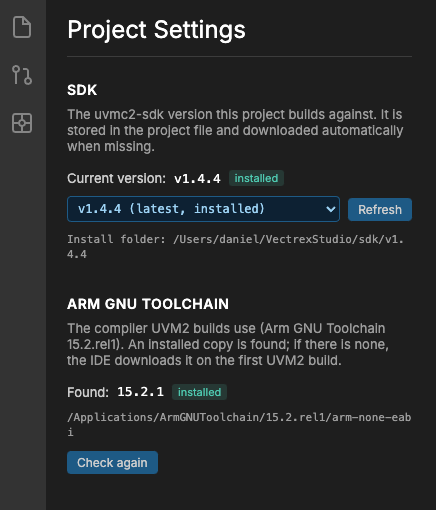
With a project open, the Project Settings panel:
- shows the release the project is pinned to;
- lists the releases installed on your machine and the ones published on GitHub;
- changes the pin with one click, downloading the release with progress if you don't have it;
- shows the state of the Arm toolchain.
Changing the pin rewrites only the [sdk] table, so your comments and layout in the project file are kept.
Stale build folders
Build folders made with another SDK release would confuse CMake. When you change the pin, the IDE notices and starts fresh, with a line like this in the build output:
[SDK] build_uvm2/ is stale: ... Deleted, the build recreates it
Never edit an installed SDK by hand
If an installed release has been changed by hand, every build against it prints a warning:
[SDK] WARNING: SDK vX here is a local copy changed by hand ...
Such a project builds on your machine and nowhere else, because every other machine downloads the published release. The fix is to change the SDK repository, publish a release, and pin the project to it.
The Toolchain Around the SDK
pico-sdk
UVM2 builds link through Raspberry Pi's pico-sdk. It is pinned too: the IDE downloads the version the SDK release asks for, 2.2.0 today, into ~/VectrexStudio/pico-sdk/<version>/ on the first UVM2 build.
The download is complete, with all its submodules (TinyUSB, lwIP, BTstack, mbedTLS, cyw43, and the nested ones), the same tree git clone --recursive would leave, about 305 MB installed. An older install made without the submodules is downloaded again on the next UVM2 build. A CMake cache made with a different pico-sdk is discarded and reconfigured.
Arm GNU Toolchain
UVM2 builds use Arm GNU Toolchain 15.2.rel1 and nothing else, so a game is the same size on every machine. The IDE looks for it in this order:
UVM2_ARM_TOOLCHAIN, if you set it (any version; the build output says so when it is not 15.2);- a 15.2 already installed: the IDE's own copy in
~/VectrexStudio/toolchains, Arm's macOS package,/optor/usr/local, or thePATH; - otherwise, on the first UVM2 build, it downloads Arm's archive for your machine once: about 150 MB, checked against a pinned SHA-256.
Other versions, such as a Linux distribution's gcc-arm-none-eabi, are listed in Project Settings with the reason they are not used.
Rust
The SDK's drawing layer is built with Rust, pinned by the SDK itself. If neither rustup nor cargo is installed, the IDE runs the official rustup installer for you (into ~/.cargo, no sudo). Every step shows in the build output.
Building From the Command Line
vpy_cli never downloads anything; it only uses an SDK that is already installed. It looks, in order, for:
- the part's own variable (
UVM2_SDK_DIRorVPY_C_DIR); UVMC2_SDK, the SDK root;- the project's
[sdk] version, installed by the IDE under~/VectrexStudio/sdk/<version>/.
# Use the release the IDE already downloaded for this project:
vpy_cli build mygame/mygame.vpyproj --target uvm2

# Or point at any SDK checkout explicitly:
UVMC2_SDK=~/src/uvmc2-sdk vpy_cli build mygame.vpy --target uvm2
A lone .vpy has no project, so only the variables apply. C projects build with their own Makefile and take the SDK the same way:
make uvm2 UVMC2_SDK=~/VectrexStudio/sdk/v1.4.4The SDK root can be moved with VECTREX_STUDIO_SDK_DIR, and the pico-sdk root with VECTREX_STUDIO_PICO_SDK_DIR.
Platforms
| Platform | What you need to know |
|---|---|
| Windows (x64 and ARM64) | The first C, UVM2 or simulator build downloads every tool it needs into ~/VectrexStudio/toolchains/windows/, each pinned by version and checksum: make, CMake, Ninja, picotool, Rust and emsdk. No Visual Studio, no MSYS2. On Windows on Arm the IDE picks builds that work under emulation. |
| Linux | The .deb pulls in the build tools as dependencies (cmake, a C/C++ compiler, libusb, curl, git, xz-utils), starts correctly under Ubuntu's AppArmor, and installs a udev rule so the UVMC2 works without sudo. On the first upload the IDE builds a picotool with USB support. |
| macOS | macOS 12 or later. On Apple Silicon the Arm toolchain is downloaded if you don't have it. For uploads, install picotool with brew install picotool. |
On other Linux distributions, install the same tools yourself:
sudo dnf install cmake gcc-c++ pkgconf libusb1-devel git xz rustup     # Fedora
sudo pacman -S cmake base-devel libusb git xz rustup                   # Arch
Upload to Cartridge works on Windows the same as on the other systems, and has been run there with a real cartridge. The cartridge's USB devices are WinUSB, so there is no driver to install. See Targets & Cartridges for the upload itself.